In 2025, Artificial Intelligence has become more than just a trend it is now a daily helper for work, study, and personal tasks. From writing and planning to managing time and meetings, AI tools are making life easier and faster. Choosing the right AI tool can save hours every week and improve focus. This guide brings you the Best AI Tools to Boost Productivity in 2025, with clear details on how they work and why they matter.
What Makes an AI Tool Truly Productive?
Not every AI tool can improve your work. A truly productive AI tool is one that saves time, reduces stress, and helps you finish tasks better. Some tools look advanced but do not give real value. To know if an AI tool is worth using, check these key points:
- Easy to Use: The tool should have a simple design so anyone can start quickly.
- Automation: It should handle repeat tasks on its own, like emails, notes, or reminders.
- Integration: A good AI tool connects with other apps you already use, such as Google Docs, Slack, or Zoom.
- Customization: You should be able to set preferences so the tool works in your own style.
- Cost-Effective: It must give good results, whether in free or paid plans.
- Reliable & Safe: A strong AI tool keeps your data secure and works without frequent errors.
When a tool covers these points, it becomes truly productive and adds real value to your daily work.
Top AI Tools to Boost Productivity in 2025
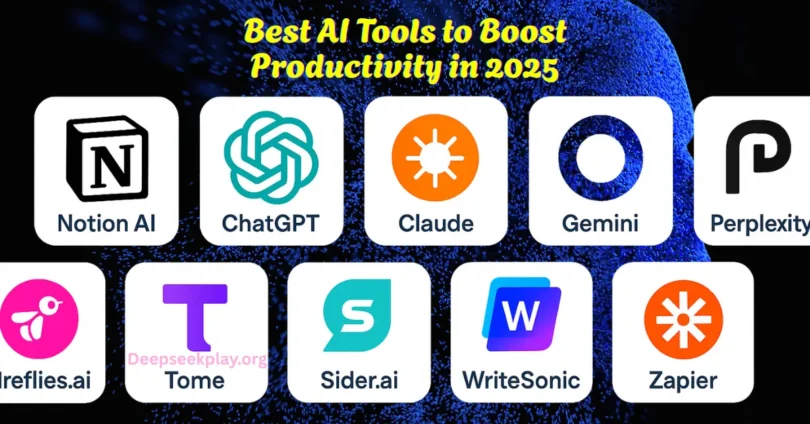
AI tools are changing the way people work in 2025. From writing to planning and even handling emails, these tools make tasks faster and easier. Here are the top options you should know:
- ChatGPT (Latest Version): Best for content creation, brainstorming ideas, and answering questions.
- Notion AI: Helps in managing notes, tasks, and projects with smart suggestions.
- GrammarlyGO: Improves writing quality, fixes grammar, and adjusts tone for clear communication.
- Motion: Organizes schedules, plans tasks, and saves time with automatic calendar management.
- Otter.ai: Records and summarizes meetings, making note-taking effortless.
- Jasper AI: Creates blogs, ads, and social media posts quickly with AI-driven writing.
- Superhuman AI: Makes email writing faster, with smart replies and better inbox control.
- Perplexity AI: Acts like an AI search assistant that finds accurate information quickly.
These AI tools are among the best choices in 2025 for boosting productivity, saving time, and making daily work easier.
How to Use These Tools Together – Step by Step Workflow
AI tools work best when they are used together in a proper flow. Instead of using each tool randomly, you can create a step-by-step routine that makes your day more productive. Here’s how you can do it:
- Plan Your Tasks: Use Notion AI to list down your daily and weekly tasks. Add reminders and deadlines so nothing is missed.
- Write and Create Content: Use ChatGPT or Jasper AI for writing blogs, emails, or ideas. Improve your writing with GrammarlyGO to make it clear and professional.
- Manage Meetings and Notes: Record your meetings with Otter.ai. Let the tool create a quick summary so you don’t have to take notes by hand.
- Organize Your Time: Use Motion to automatically schedule tasks and meetings in your calendar. Block focus time to finish important work without distractions.
- Handle Emails Smartly: Use Superhuman AI to reply faster and manage your inbox easily. Save templates for common emails to reduce typing.
- Research and Find Information: Use Perplexity AI or similar AI search tools to get quick and reliable answers. Add useful links and notes back into Notion for future use.
- Review and Improve: At the end of the week, check which tools saved you the most time. Adjust your workflow by adding or removing tools as needed.
By using these AI tools step by step, you can create a smooth workflow that saves hours every week and makes your work easier and more effective.
Tips to Make the Most Out of AI Tools (Dos and Don’ts)
AI tools can make your work faster, but only if you use them the right way. Here are some simple tips that show what to do and what to avoid:
1. Do’s
- Be Clear with Prompts: Always write clear and detailed instructions for better results.
- Learn the Settings: Check features like tone, style, and integrations to get the best output.
- Start Small: Begin with one or two tools before adding more to your workflow.
- Use Free Trials: Test different tools first to see which one fits your needs.
- Combine Tools: Use writing, scheduling, and note-taking tools together for full productivity.
2. Don’ts
- Don’t Rely Fully on AI: Always check the final work yourself before using it.
- Don’t Use Too Many Tools: Having too many apps can create confusion and waste time.
- Don’t Ignore Privacy: Avoid putting sensitive data into tools that are not secure.
- Don’t Expect Perfection: AI can make mistakes; treat it as a helper, not a replacement.
- Don’t Skip Updates: Keep your AI tools updated to get the newest and most reliable features.
Following these simple dos and don’ts will help you get real value from AI tools while avoiding common mistakes that slow down productivity.
Common Mistakes and How to Avoid Them
Even the best AI tools will not give good results if they are used in the wrong way. Many people repeat the same errors that waste time instead of saving it. Here are the most common mistakes and how you can avoid them:
1. Depending on One Tool Only
- Mistake: Using just one AI tool for all types of work.
- Fix: Choose different tools for writing, scheduling, and meetings to cover all needs.
2. Writing Vague Prompts
- Mistake: Asking AI with short or unclear instructions.
- Fix: Give detailed prompts with clear goals to get better answers.
3. Ignoring Free Limitations
- Mistake: Using only free versions without checking what’s missing.
- Fix: Compare free and paid plans to see if upgrades save more time.
4. Forgetting Human Review
- Mistake: Trusting AI results without checking them.
- Fix: Always proofread and edit before using AI-generated work.
5. Not Using Integrations
- Mistake: Keeping tools separate instead of connecting them.
- Fix: Link tools with apps like Google Docs, Slack, or calendars for smoother workflow.
6. Using Too Many Tools at Once
- Mistake: Downloading every new AI app and getting confused.
- Fix: Stick to a small set of tools that truly help your work.
By avoiding these mistakes, you can make AI tools work smarter for you and save more time every day.
Future Trends in AI Productivity (What to Watch in 2025+)
AI is moving fast, and the tools we use today will become even smarter in the near future. Here are some key trends to watch that will shape productivity in 2025 and beyond:
- Multi-Agent AI Systems: Future tools will have multiple AI agents working together, each handling a specific task like writing, scheduling, and data analysis at the same time.
- Smarter Context Understanding: AI will not just follow commands; it will understand your work style, goals, and habits to give more personal results.
- Advanced Voice and Gesture Control: Instead of typing, many tools will allow voice and even hand-gesture commands for faster interaction.
- Deeper App Integrations: AI tools will connect more smoothly with apps like email, calendars, and project boards, removing the need to switch between different platforms.
- Real-Time Collaboration: Teams will be able to work together with AI in real time, making group projects easier and quicker.
- Stronger Data Security: As more people use AI daily, tools will focus on keeping user data private and safe with better protection systems.
The future of AI productivity is about smarter, faster, and more personalized tools that will become an essential part of everyday work in 2025 and beyond.
Common FAQs About Best AI Tools to Boost Productivity in 2025
Common FAQs About Best AI Tools to Boost Productivity in 2025 help clear doubts and provide quick insights for smarter tool selection.
1. Can AI tools help students improve their studies in 2025?
Yes, many AI tools now support students with homework help, research summaries, and smart note-taking features.
2. Are AI productivity tools available in mobile apps?
Most popular AI tools offer mobile versions, so you can manage tasks and projects directly from your phone.
3. Do AI tools support multiple languages?
Yes, modern AI tools can translate, write, and respond in many languages, making them useful for global users.
4. How do AI tools save time for small business owners?
They handle tasks like writing emails, creating invoices, scheduling clients, and managing social media automatically.
5. Can AI tools be used offline?
Some tools work offline with limited features, but most require an internet connection for full performance.
6. Do AI tools replace personal assistants at work?
AI tools reduce the need for manual help, but they work best when combined with human decision-making.
7. What type of tasks can AI tools not handle well?
AI struggles with highly creative decisions, deep emotions, or tasks that need human judgment.
8. Are there free AI tools that are still effective?
Yes, many AI tools offer strong free plans, though advanced options usually come in paid versions.
9. Can AI tools connect with smart home devices?
Some AI productivity tools are now linking with smart devices, helping to manage reminders, alarms, and routines.
10. How fast is AI technology growing in productivity tools?
AI productivity tools are improving every few months, with updates that bring smarter features and better accuracy.
Conclusion
In 2025, AI tools have become powerful partners for both personal and professional work. From writing and planning to scheduling and research, these tools save hours and reduce stress. The key is not just choosing the best tool but also using it in the right way. By adding the right mix of AI apps into your daily routine, you can work smarter, focus better, and achieve more with less effort. The future of productivity belongs to those who know how to use AI as a helper, not just a trend.
Written By: Deepseekplay